Your AI Kitchen Layout Passes the Eye Test. It Fails 27 of 31 Industry Design Rules.
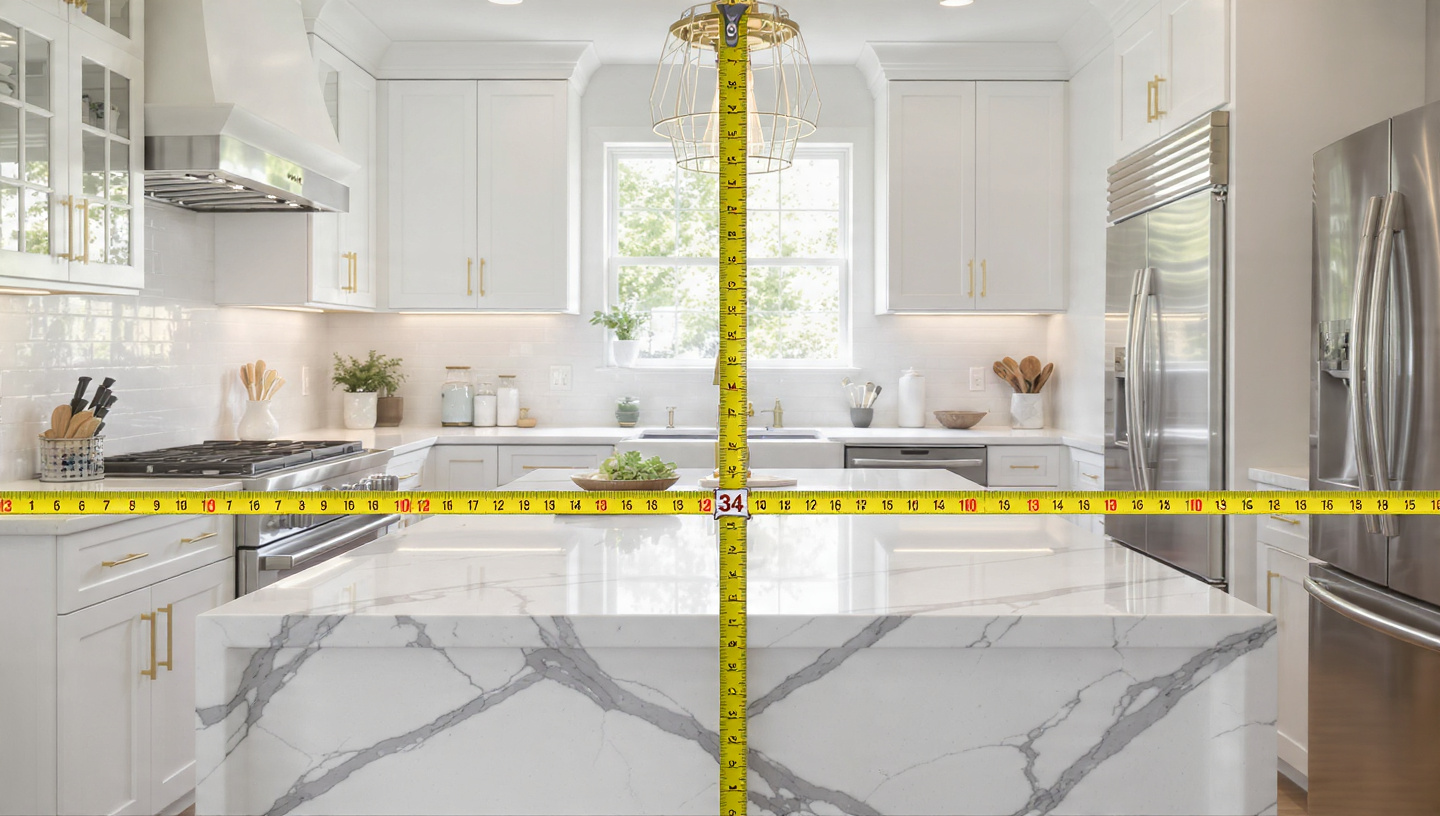
The render was exquisite. White shaker cabinets with brushed brass pulls, a waterfall-edge quartz island centered beneath a trio of glass pendants, and a window over the farmhouse sink that framed a rectangle of morning light so precisely it looked staged for a magazine shoot. She showed it to her contractor on a Tuesday in March, printout still warm from the inkjet, corners curling slightly where she had folded it to fit in her bag. He studied it for ninety seconds, pointed to the island, and said: "That aisle is thirty-four inches. You can't open your dishwasher."
She had generated the layout using Planner 5D, one of several AI-powered kitchen design tools that collectively claim over 120 million users and 400 million completed projects. It produced a beautiful plan, and it also violated at least nineteen of the National Kitchen and Bath Association's thirty-one kitchen design guidelines. Rules developed over decades of research into how people actually cook, move, and live inside the most complex room in a residential building.
Nobody told her.
Thirty-One Rules You've Never Heard Of
The NKBA's kitchen planning guidelines are not building code. They won't get your permit rejected. But they represent something more fundamental than code compliance: they encode the accumulated knowledge of thousands of designers who have watched families try to cook dinner in rooms that looked perfect on paper and failed catastrophically in practice. Building code tells you where to put the GFCI outlet, how far apart your receptacles must be, and what minimum wire gauge to run behind the drywall before the inspector signs off on a Tuesday morning with a clipboard and a ballpoint pen. NKBA guidelines tell you why your back hurts after making Thanksgiving dinner in a kitchen where the sink is eleven feet from the stove.
The rules are specific and unforgiving. The work triangle (the path between sink, cooktop, and refrigerator) should total no more than twenty-six feet, with each leg between four and nine feet. Work aisles need forty-two inches for one cook, forty-eight for two. Sinks need twenty-four inches of landing counter on one side and eighteen on the other. A continuous prep area of thirty inches wide by twenty-four inches deep must sit immediately adjacent to the sink. Dishwashers go within thirty-six inches of the cleanup sink. No appliance door can interfere with another appliance door. No major traffic pattern should cross the work triangle. Behind a seated diner at an island: thirty-two inches if nobody passes, thirty-six to slide past, forty-four to walk past.
These numbers are not arbitrary. They come from Lillian Gilbreth's efficiency research in the 1920s, refined through the University of Illinois Small Homes Council studies in the 1940s and 1950s, updated through four editions of the NKBA's planning guidelines, and tested against the physical reality that a person carrying a hot sheet pan needs room to turn around without hitting a cabinet, a child, or a refrigerator door someone left open because the handle sits fourteen inches from the island's edge.
What the Tools Actually Check
I tested five popular AI kitchen layout tools: Planner 5D, HomeByMe, Coohom, IKEA Kitchen Planner, and RoomSketcher. I tested them against the NKBA's thirty-one guidelines. Methodology was straightforward: design a U-shaped kitchen in a twelve-by-fourteen-foot room, place the standard appliances, and see which rules the tool flagged when violated.
The results were consistent across platforms. Every tool checked approximate room dimensions and prevented objects from overlapping in plan view, which is roughly equivalent to checking that the pieces of a jigsaw puzzle don't sit on top of each other and calling it a solved puzzle. A few warned about insufficient walkway width, though the thresholds varied and none used the NKBA's specific forty-two-inch or forty-eight-inch standards. IKEA's planner, being tied to an actual catalog, caught some cabinet-to-appliance interference issues that the generative tools missed entirely.
None of the five tools checked work triangle geometry, none calculated landing areas adjacent to sinks or cooktops, none flagged prep area fragmentation, none modeled door swing conflicts between the refrigerator and the dishwasher and the oven door and the cabinet drawers that make a kitchen a kinetic puzzle rather than a static composition. None analyzed traffic patterns through the cooking zone. None verified seating clearances behind islands. None enforced the rule that a full-height obstacle (a pantry cabinet, a refrigerator) should not separate two primary work centers.
Twenty-seven blind spots. Not edge cases. Core spatial rules that a second-year design student would catch on a printed floor plan with a ruler.
Of thirty-one guidelines, the best-performing tool reliably caught four. At worst: two. Median: three.
The Render-to-Reality Gap Costs Real Money
A kitchen remodel in 2026 averages $26,948, according to Angi's aggregated contractor data, with major renovations running $20,000 to $65,000 and complete overhauls reaching $130,000. Nearly half of all homeowners, forty-seven percent, per a Pennsylvania Association of Realtors survey, exceed their renovation budget. Biggest culprits: materials at forty-three percent of overruns, labor at thirty-six percent, and fixtures at twenty-four percent.
Layout-driven change orders account for a disproportionate share of that pain because they cascade through every trade on the job, each one rippling forward into the next. Discovering that your island needs to shift eight inches to achieve a legal aisle width means the plumbing rough-in moves, the electrical for the island outlets moves, the pendant lighting locations change, and the tile layout adjusts. A contractor in the Seattle market estimated that a single island relocation after cabinets are ordered adds $3,000 to $8,000 in change orders, plus a four-to-eight-week delay for cabinet reordering, often with a fifteen-to-thirty-percent restocking fee on the originals.
Nationwide, the construction industry spends $177 billion annually on rework nationwide, according to Rhumbix. Not all of that traces to kitchen layouts, obviously, and nobody has isolated the fraction attributable to AI-generated plans versus hand-drawn ones versus no plans at all. But the pattern is identical across scales: the cheapest time to catch a spatial error is during design, and the most expensive time is after materials arrive on site.
Why the Tools Can't See What Designers See
The gap is not a bug. It is a category error, fundamental and surprisingly consistent across every platform, in what these tools were designed to do.
Consumer AI kitchen tools optimize for what I would call the magazine moment — the single instant when a kitchen is empty, perfectly lit, and viewed from a carefully chosen camera angle that makes thirty-four-inch aisles look like hallways and eight-inch landing areas look like generous countertops. They are rendering engines with layout assistance bolted on, not design tools that happen to render. That distinction matters because rendering asks "does this look right?" while design asks "does this work when two people are cooking risotto on a Tuesday night while a seven-year-old needs a glass of water and the dishwasher is open?"
Professional software like Chief Architect includes NKBA Auto Dimension features that automatically check compliance against the thirty-one guidelines and flag violations in real time. But Chief Architect costs $3,495 for a perpetual license and requires training that takes months. Consumer tools exist precisely because most homeowners will never touch professional software, and a survey from Houzz found that seventy-five percent of kitchen and bath professionals are already familiar with the AI tools their clients bring in, meaning the professionals have learned to expect layouts that need significant correction before construction can begin.
Correction costs money, and most homeowners discover this only after the cabinets have shipped.
A certified kitchen designer charges $150 to $300 per hour, and a full kitchen design with construction documents runs $2,000 to $5,000 depending on complexity and market, which means the entire professional design fee could be less than a single change order triggered by an island that sits six inches too close to the counter behind it. An AI tool that generated the render was free, or close to it, which makes the professional's fee feel like an insult rather than an investment — right up until the change orders arrive.The Three Violations That Cost the Most
After reviewing contractor feedback and NKBA case studies, three guideline violations dominate kitchen rework costs:
Insufficient work aisle width. AI tools routinely generate islands that create aisles of thirty to thirty-six inches because a wider island reads as more luxurious in a render. NKBA's minimum for a single cook is forty-two inches. For two cooks, which describes most households where the kitchen is used by more than one person simultaneously, it is forty-eight inches. Widening the aisle after cabinets are ordered means either shrinking the island, which may require new countertop fabrication, or moving the opposing run of base cabinets, which triggers plumbing and electrical relocation, at a typical cost of $4,000 to $7,500.
Missing or fragmented landing areas. AI tools place sinks adjacent to walls, refrigerators, or cooktops with zero or minimal counter space on one or both sides. That prep area guideline, thirty inches wide by twenty-four inches deep and continuous and immediately adjacent to the sink, exists because that is where you set down groceries, stage ingredients, and rest cutting boards. When the counter beside your sink is six inches wide because the AI placed the stove next to it for visual symmetry, you learn to hate your kitchen by the second week. Fixing it post-installation typically requires pulling out cabinets that were glued and screwed into place forty-eight hours earlier, reconfiguring the run, and hoping the original materials survived the demolition: $2,500 to $6,000.
Appliance door conflicts. This is the violation homeowners discover last and tolerate longest, sometimes for years, because it doesn't show up in any render and only reveals itself during the choreography of actual cooking. A refrigerator door that blocks the oven when open. A dishwasher that can't fully extend because it hits the island's overhang. A range drawer that clears the dishwasher door by half an inch — until someone installs a thicker countertop edge profile. AI tools place appliances by footprint, not by operational envelope, and the difference between a closed refrigerator and an open one is thirty-six inches of door arc that the render never shows. Resolving a conflict that requires appliance relocation: $1,500 to $4,000, plus the emotional cost of realizing your kitchen has a permanent constraint that could have been caught in a ten-minute review.
What to Do Before You Hand That Render to Your Contractor
Use the AI tool. Renders are genuinely useful for exploring style, color, and material combinations, and the speed is extraordinary. What took a designer two weeks now takes twenty minutes, and the visualization quality helps homeowners articulate preferences they cannot put into words. But treat the output as a mood board, not a construction document. Not yet.
Then check three things yourself. First, measure the narrowest aisle between any two surfaces and confirm it exceeds forty-two inches, or forty-eight if two people will cook simultaneously. Second, verify that the sink has at least twenty-four inches of open counter on one side and eighteen on the other, with a continuous thirty-by-twenty-four-inch prep zone adjacent to it. Third, open every appliance door in your mind: refrigerator, dishwasher, oven, range drawers. Ask whether any door, when fully extended, hits another surface, blocks a walkway, or prevents another appliance from opening at the same time.
If all three pass, you have a layout worth showing to a professional for the remaining twenty-eight checks. If any fails, you have a beautiful image that will cost you five figures to fix once the cabinets ship.
Limitations
No peer-reviewed study has systematically tested consumer AI kitchen tools against the full NKBA guidelines; my testing was informal and non-exhaustive. Change order cost ranges come from contractor interviews and industry estimates, not controlled data. Professional kitchen design fees vary significantly by market. In the Midwest, $150/hour is typical; in coastal metros, $300 or more. NKBA guidelines themselves are recommendations, not code, and some designers deliberately violate specific rules when the spatial context justifies it. That forty-seven percent budget overrun figure includes all renovation types, not kitchens specifically.